TutorialsPlesk

System overview Plesk

Learn how to view system information and server resource usage in Plesk. Follow the simple steps to access essential details.

Views 592Updated 1 anPublished on 30/05/2019by Florin Petran

Introduction

  • In this tutorial, we will show you how to view information about the system and information about the server resource usage.


Requirements

  • Access to the administration panel, user and password provided by Hostico.

Steps

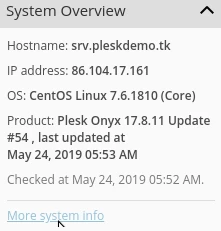
  • We log in to the Plesk panel, and on the right side of the screen we have System Overview.
System Overview Plesk

  • Here we can see information about the hostname, IP address, panel type, and its version.
  • More information about resource usage can be found at More system info.

More system info Plesk

Similar Articles

Creating a Hostico client account.Tutorials /Commercial

Learn how to create a client account on Hostico, step by step. Follow the instructions to fill in the necessary details and comply with the terms.

4
by Mark Dohi
Views 2104
Updated 7 months ago
Published on 30/06/2017
Adding Additional Domains in the Webuzo PanelTutorials /Webuzo

Learn how to add an additional domain in the Webuzo panel. Follow the simple steps to manage domains and subdomains efficiently.

4
by Alexandru Rogojan
Views 1123
Updated 1 year ago
Published on 14/09/2017
Changing the email address associated with the Hostico client account.Tutorials /Commercial

In this tutorial, the procedure applied for changing the email address in the Hostico client account is exemplified.

2
by Mark Dohi
Views 1974
Updated 6 months ago
Published on 18/07/2018
Setting the nameservers from the Hostico client accountTutorials /Commercial

In this tutorial, we will present the method for changing (updating) the nameservers in the Hostico client account.

by Mark Dohi
Views 3760
Updated 3 months ago
Published on 22/05/2018
Web Statistics PleskTutorials /Plesk

Learn how to view statistics about your website's traffic through Plesk, including data about storage space and visitors, for an effective evaluation.

by Alexandru Jurca
Views 812
Updated 1 year ago
Published on 16/07/2021
CornerCorner