Tutorials • Commercial

Changing the password in the client account.

Find out how to change your Hostico account password step by step. Follow the instructions to secure your account and use a strong password!

Views 501Updated 1 anPublished on 08/07/2017by Mark Dohi

Introduction

  • This tutorial will explain the necessary steps to change the password of your Hostico client account from within it;

Requirements

  •  existing Hostico client account;

Steps

  • After logging into the Hostico client account, go to the User, on the left side of the screen;
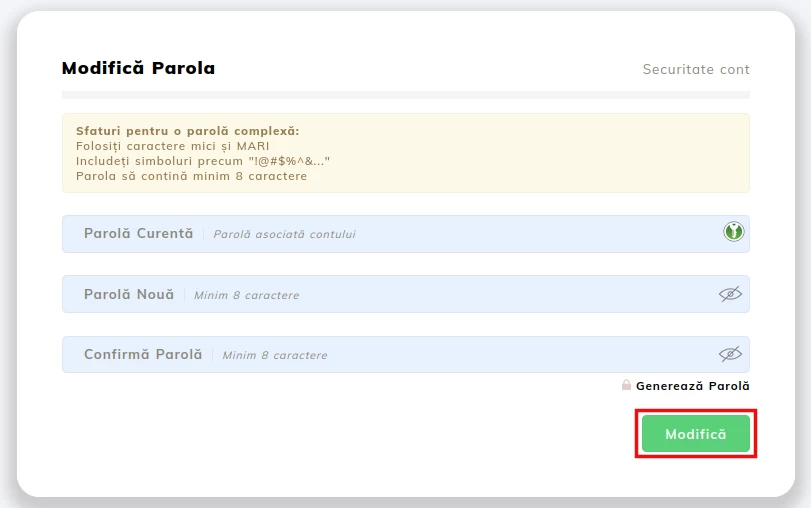
  • In the opened interface, go to the right side in the section Change Password;
  • Enter the existing password in the first field and the new password you wish to use in the other two fields - then confirm the new password;
  • After entering the password, click on the Change.
    button.

  • Once the password change action is completed, the window will return to its initial form.

Note

  • To ensure that the chosen password is secure, it is advisable to use different types of characters (numbers, symbols, uppercase and lowercase letters).
 

Similar Articles

Creating an email account in cPanelTutorials /cPanel

The cPanel allows for the creation of an unlimited number of email accounts associated with hosted domains. This tutorial will explain the necessary steps to create and access an email account.

27
by Cătălin Adrian
Views 5243
Updated 1 year ago
Published on 28/06/2017
Adding a secondary contact (Subcontact)Tutorials /Commercial

Add a secondary contact in your Hostico client account by following these simple steps. Make sure you have an existing account and activate the necessary rights.

27
by Mark Dohi
Views 2602
Updated 1 year ago
Published on 08/07/2017
Cancellation of hosting services.Tutorials /Commercial

In this tutorial, we illustrate the process of canceling a hosting service from the Hostico client account.

22
by Mark Dohi
Views 1528
Updated 1 year ago
Published on 04/06/2018
Modification of the proforma invoiceTutorials /Commercial

In this tutorial, the actions necessary for modifying the data of an unpaid pro forma invoice are presented.

13
by Mark Dohi
Views 5745
Updated 2 years ago
Published on 29/05/2019
Authentication in cPanel from the client account.Tutorials /Commercial

This tutorial will illustrate the procedure that can be used to log into the cPanel of a hosting service from the Hostico client account.

11
by Mark Dohi
Views 5645
Updated 1 year ago
Published on 05/06/2018
pixel
0
productproducts
Error
CornerCorner
Client
Shop
0
Cart
0
Chat
Menu
Log InÎnscrie-te
  • Client
  • Services
  • Domains
  • Shop
  • Financial
  • Cards
  • Tickets
  • Profile
  • Tutorials
  • FAQs
  • Blog
Language
English Language
English
Romanian Language
Română
Socials
Terms
Privacy
GDPR
SLA